
How to fix mobile phone Battery Drainage.
- Technology in smartphone is day by day advance & the advanced Mobile phones are very fast. which is the main reasons of battery drainage.
- At every updates in mobile phone a new features are added which requires more battery drainage.
- Some updates are also help in improving battery life.
- A powerful processor is main reason for battery drainage.
- If your devices take too much power from normal, so don’t worry our team helping us, for fixing battery drainage too much.
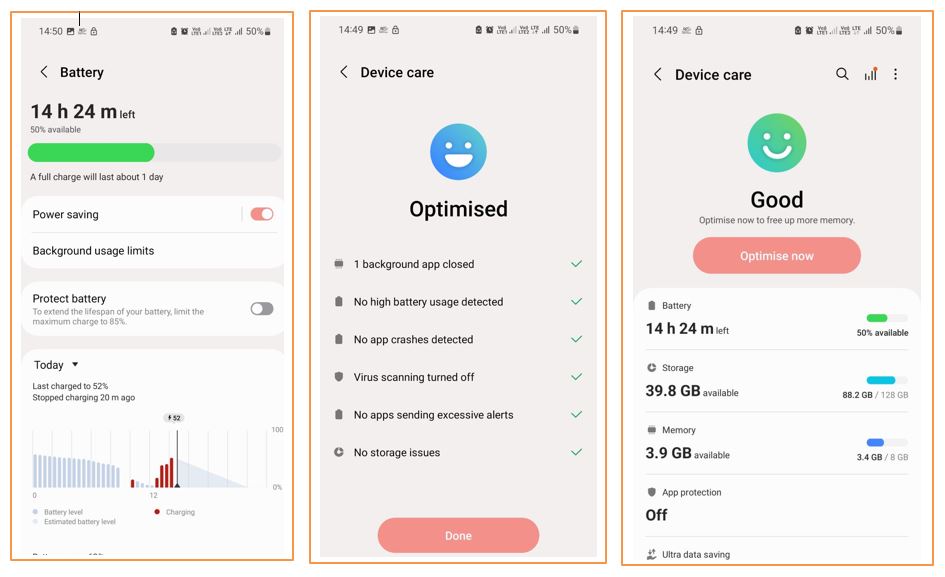
Main causes of smartphone battery drainage fast.
- Screen Brightness is too much.
- Screen timeout is higher.
- Apps running in Background.
- Unwanted apps are installed in mobile phone.
- Most Apps used a location service.
- Phone has low network service.
- Many apps notification services is active.
- Mobile phone serviced not timely.
- Unnecessary connectivity.
- keyboard sounds & Vibrations
- Phone has older version of operating system.
- Improve charging habit’s.
- Perform system troubleshooting.
- Extreme temperature variations.
- Phone battery is old(last stage)
How to make phone battery Last Long.
At previous you can seen main causes for Android phone battery drainage fast. Smartphone battery last long detailed tips & solution Given below, by the follow these tips you can used your smartphone for Long time.
1. Adjusting Screen Brightness
Try to Adjust screen brightness at medium level. This step make your your mobile battery last long, Lower screen brightness also reducing the chances of screen pixel burning issues, you can also use dark mode for saving extra battery.
2. Less screen timeout
Screen timeout means, The time which is require to mobile phone for go to sleep. Less screen timeout require less energy, So if you want to long last battery. you can set less screen timeout.
3. Close Apps Running in Background
In mobiles phone some apps running in background. These apps are uses some battery power, If you close these app from background, Your battery consumption decrease and battery long last.
4. Uninstall the Unwanted apps
When you open battery setting you can see apps battery usage, Some apps are Power-Hungry, you can identify, if these apps are not useful you can uninstall these apps.
5. Apps location uses close
Some apps are use location service. If you feel this location service not necessary, You can close this service and this service can improve your battery draining time.
6. Mobile phone in network service
Make sure your phone in network range, If your phone have low signal connectivity this can uses more battery and your battery drain quickly. You have to always in network range.
7. Closed the apps notification services.
If the apps notification services is active, Then this take too much battery, At every notification some battery used and as you know that these time so many notification are comes everyday. You have to ensure that all notification services are closed of all unnecessary apps.
8. Phone serviced timely.
Some dust particles moistures entered in your mobile phone which make your battery drainage faster. After long time using of single mobile phone requires a timely services, which makes a battery long lasting.
9. Disable unnecessary connectivity.
Close all unnecessary connectivity like, Bluetooth, Wi-Fi, Hotspot, Location services, etc. which is not use in currently. After that the battery drainage comes slow.
10. Off keyboards sounds & Vibrations
Vibrating motor and sound creating speaker uses too much battery, And this functions are uses in mobile phone continuously so we have to ensure that keyboard sounds and vibrations functions should be off.
11. Use Updated version of Operating system.
Operating system updates often include battery optimization improvements. Apps updates also requires less battery uses, So these updates make your mobile phone long last.
12. Improve charging habits.
Avoid your phone to exposing high & low temperature conditions. Always use original charger because this is make according to phone circuits this habits make your battery long lasting. Don’t overcharge your mobile phone Because this make your mobile phone battery life degrading. Remove mobile case during charging because this case dissipate heat in case which also degrading battery life.
13. Perform System trouble shooting.
Restart your phone periodically, Because a simple reboot fixes the mobile phone bugs and improving battery health. Factory reboot also help us to bug fixing and improving battery life, Check battery health by using setting features, this feature say about your battery health, If battery at last stage then you have to replace it immediately.
14. Save from extreme temperature variations
A extreme temperature variation not only the battery drains fast, this can explodes your mobile phone battery, Always try to keep phone at safe place(Normal temperature range).
15. Replace old battery.
Old battery draining very fast, If your mobile phone don’t give battery backup, first you have to ensure that battery age, If the age of the battery is generally more than over 3 year or you use the over 1000 charging cycle, then you should replace this old battery as soon as required, Because this battery never run your mobile phone at long time.